
You hit publish. Then… crickets.
Sound familiar?
The thing is, creating a brilliant video is only half the battle.
If nobody can find it, it can’t educate your audience, build trust or generate new business. That’s where knowing how to SEO optimise videos for YouTube comes in.
We’ve previously explored what YouTube SEO is and why it’s become such an important part of modern digital marketing. We’ve also discussed how video can help your SEO strategy. Now it’s time to put that knowledge into practice.
Whether you’re a marketing manager looking to get more value from your video content or a business owner wanting to grow your YouTube channel, this guide will walk you through exactly how to optimise YouTube videos for long-term success.
Let’s get into it.
Why YouTube SEO Matters More Than Ever
Many businesses still think of YouTube as somewhere to upload videos once they’re finished. In reality, it’s one of the world’s largest search engines.
Every day, people search YouTube for things like product reviews, tutorials, business advice, software demonstrations and answers to problems they’re trying to solve. In fact, according to figures from The Trust Agency, YouTube processes over 3 billion searches a month.
That’s an enormous opportunity for businesses.
Rather than waiting for customers to discover your website through Google alone, YouTube gives you another chance to appear exactly when people are searching for your expertise. Plus, optimised YouTube videos also now appear in Google search results, giving your content even greater visibility.
To get a piece of this pie, all you need to do is create videos that answer the questions your audience is already asking. YouTube SEO best practices can help you do that by giving the platform an understanding of exactly what your videos are about.
And we’re going to show you exactly how to do that.

Step 1: Start with Keyword Research
Before you even think about filming, you need to answer one important question: What are your people actually searching for?
This is where YouTube keyword research comes in, and one of the biggest mistakes businesses make is creating videos they want to make rather than videos their audience actually wants to watch.
Good keyword research removes the guesswork, because instead of hoping people are interested, you’re creating content around proven demand.
So, How Do You Find SEO Keywords for YouTube?
Thankfully, you don’t need expensive software to get started. Here are a few of our favourite methods:
YouTube Autocomplete is Your Free-to-Use Friend
Head to YouTube and start typing your topic. You’ll instantly see suggested searches based on what people are actively looking for.
For example, let’s say you want to educate your audience on getting started in podcasting. Start by typing: “How to start a podcast”
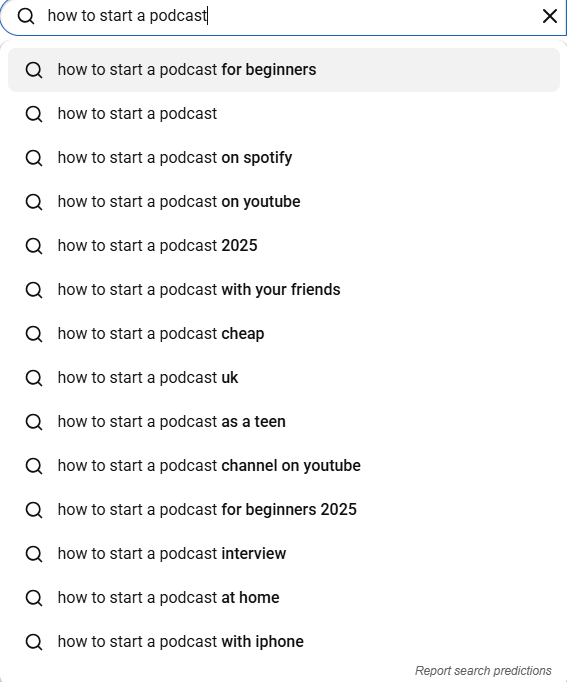
Straightaway, you’ll start to see related topics that your target audience is searching:
- How to Start a Podcast on YouTube
- How to Start a Podcast for Beginners
- How to Start a Podcast on Spotify
- How to Start a Podcast Setup
- How to Start a Podcast with iPhone
- How to Start a Podcast and earn money
That’s valuable insight straight from your audience.
Check Google’s “People Also Ask”
A keyword research resource that’s often overlooked because of how simple it is. But good SEO is all about matching demand rather than complex tools and techniques. And many YouTube searches begin on Google.
Search your topic and look at the “People Also Ask” box.
If people are asking those questions in Google, there’s a good chance they’d also watch a video answering them.
Look at Competitor Videos
This is all about using what’s already working. Search your chosen topic on YouTube. Which videos rank highest?
Don’t copy them, but do ask yourself:
- What questions do they answer?
- What titles grab your attention?
- What information could you explain better?
- What’s missing?
To be clear, your goal isn’t to create the same video. It’s to find the missing pieces to create the most helpful one.
Use Keyword Research Tools
If you’re serious about growing your YouTube channel, tools like Semrush, Ahrefs, TubeBuddy and vidIQ can uncover things like search volume, keyword difficulty, related searches and trending topics.
These can help you prioritise which videos are worth investing your time in.
Reels Pro Tip: Don’t chase the biggest keywords. It’s often better to rank for a specific long-tail search like “How to start a video podcast without spending lots of money” than compete with thousands of creators targeting simply “How to start a video podcast”.
Step 2: Understand Search Intent
Finding a keyword is only the beginning. You also need to ask yourself: “Why is someone searching for this?”
This is search intent. For example, someone searching: “How to start a podcast on YouTube” is looking for practical advice.
They don’t want a history lesson on podcasting and when YouTube started to become a prevalent part of the story. They want actionable steps they can follow.
Likewise, someone searching: “Best training video examples” probably wants inspiration rather than technical guidance on shooting recruitment or live training videos. The more closely your video matches the viewer’s expectations, the better it tends to perform.
That’s because YouTube is still a service platform, it wants satisfied viewers. If people click your video and quickly leave because it wasn’t what they expected or it wasn’t helpful to their search, YouTube notices.
Equally, if they stay until the end and watch more of your content afterwards, YouTube notices that too.
Step 3: Plan Your Video Before You Press Record
Optimising your YouTube videos for SEO starts long before you upload your final version.
Think about the best YouTube videos you’ve watched recently. Chances are they got straight to the point, were simple to follow, answered your question and kept your attention throughout.
That’s no accident. Before filming, ask yourself:
- What’s the one question this video answers?
- What’s the key takeaway?
- What’s the logical structure?
- Where will viewers lose interest?
- How can I keep things moving?
A clear structure doesn’t just make your video better for viewers. It also improves important YouTube ranking signals like audience retention and watch time.

Step 4: Write a Title People Actually Want to Click
Video titles are important, but not for the reason you might think. Your title has two core objectives: 1) Tell YouTube what your video is about. 2) Convince people to click. So, it’s super important to make sure your title crushes.
Creating a Killer YouTube Video Title
Workshopping the perfect title can feel harder than creating the video itself. But to create the best title for a YouTube video should:
- Include your primary keyword naturally
- Clearly explain the benefit
- Generate curiosity, not clickbait
- Be easy to understand at a glance
For example…
❌ Start a Video Podcast
✅ How to Start a Podcast on YouTube: 12 Easy-to-Follow Steps
Same topic. But which one would you click?
Remember, YouTube wants people to enjoy the platform. If nobody clicks your video, the platform has no reason to recommend it. So, it’s worth spending the time crafting a title that’s both keyword-friendly and genuinely appealing.
Step 5: Write an SEO-Friendly YouTube Description
After your title comes your video description. This is one of the easiest places to help viewers and YouTube understand your video. It’s also where most businesses fall over.
Many spend time and effort creating and uploading a video, only for process fatigue to set in. They write one sentence explaining what the video is, add a link to their website and move on.
A good YouTube description should tell viewers:
- What the video is about
- Who it’s for
- What they’ll learn
- What action they should take next
It should also naturally include relevant keywords. For example, if your video is about “how to optimise YouTube videos” (topical, huh?), then your description might naturally mention:
- YouTube SEO
- YouTube video optimisation
- improving YouTube rankings
- getting more views on YouTube
However, that doesn’t mean you should go shoving keywords into every sentence. Like Google, YouTube is smart enough to understand context – so, write for humans first.

Steal Our Simple YouTube Description Structure
We get it, sitting down to write your YouTube video description is tough. Especially after you’ve just spent ages creating the video, editing it down, settling on a strong title and uploading it to YouTube.
So here’s our code for the perfect YouTube video description structure.
The first 2-3 lines
This is the most important section because it’s what your audience will always see without needing to hit the “show more” link.
Use it to explain:
- What the video covers
- Why someone should watch
- The main benefit
A detailed summary
Expand on what viewers will learn. Give them information about the video, who’s in it, why the audience should listen to them and offer specific information on the subtopics the content covers. While you’re creating this summary, include relevant keywords where they’d work organically.
Links and calls-to-action
Be sure to add more of the good stuff to your description. After all, we’re willing to bet that the purpose of your video is to get people to check out your website, products, services, resources, grow your social channels, or to contact you.
Timestamps
If your video covers multiple sections, add chapters. This helps humans and search engines quickly decide whether this video will actually help satisfy their search. We’ll come back to these in more detail shortly.
Reels Pro Tip: Think of your description as an extension of your video. Don’t just tell people what they watched. Help them decide what to watch next.
Step 6: Create a Thumbnail That Improves Click-Through Rate
The thumbnail might be the most underrated part of your YouTube SEO, as it’s one of the biggest drivers of clicks.
YouTube looks closely at click-through rate (CTR) (the percentage of people who choose to watch your video after seeing it). A strong CTR tells YouTube that people are interested in this content.
Plus, Google reports that 90% of the most successful videos feature custom thumbnails. So, if they’re that important, let’s look into ‘how you can make your thumbnails the best damned thumbnails on the hand we call “the internet”.
What makes a good YouTube thumbnail?
- Keep text minimal: Your thumbnail shouldn’t repeat your title word-for-word. Just use a short phrase or visual hook.
- Create curiosity: A viewer should immediately understand what is this about? Why should I care? What will I learn?
- Work on mobile: Most people discover videos on smaller screens. Thumbnails that only work on desktop aren’t it.
- Use consistent branding: Consistency matters. Your audience should begin recognising your videos before they even read the title.
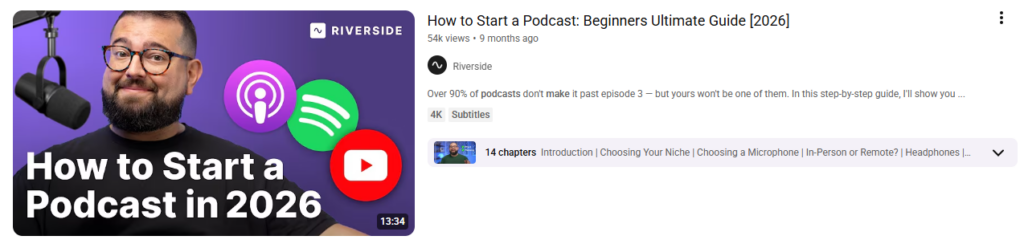
Here’s a great example of how thumbnails, great titles and descriptions work together:
Step 7: Add Chapters, Captions and Video Metadata
YouTube SEO isn’t just about keywords. It’s also about helping viewers navigate and understand your content. That’s where chapters, captions and metadata come in.
Why Add Chapters to YouTube Videos
Chapters help break your video into clear sections. Giving search engines and humans a better chance of understanding what you’re talking about.
Reels Pro Tip: Use target keywords when naming your video chapters. This gives you a great chance of appearing in AI Overviews or citations as people look for clearer, more concise responses to their queries.
For example:
00:00 Introduction
01:15 What is YouTube SEO?
03:30 Keyword research tips for YouTube
06:45 Optimising your YouTube video title
Add Accurate Captions
Captions are valuable because they:
- Improve accessibility
- Help viewers watch without sound
- Provide additional context about your video
YouTube automatically generates captions, but always review them for accuracy. A poorly transcribed video can create a frustrating experience for viewers.
Optimise Your Video File and Metadata
Before uploading, make sure your video information is clear and includes:
- File name
- Title
- Description
- Category
- Language
- Playlist placement
Think of optimisation as giving YouTube as much useful information as possible. The small details add up.

Step 8: Focus on Watch Time and Audience Retention
This is one of the biggest YouTube ranking factors. You can optimise every word in your title and description, but if people leave after 20 seconds, your video will struggle.
The platform wants to recommend videos that create a positive experience. It measures the “positivity” of your video through important trust signals like:
- Watch time
- Average view duration
- Audience retention
- Likes
- Comments
- Shares
But, with something so important, how can you know you’re getting it right – without waiting for the YouTube results to tell you?
How can businesses improve retention?
We’ve all done enough doomscrolling to know that the first few seconds of your video matter. You can almost sleepwalk into starting your video like: “Hi everyone, welcome back to another video…”
Because that’s the line we’ve heard sooooo many times from influencers – and they’re doing alright, right?
Wrong. Leave those long and winding entries in the early 2000’s where they belong. Get to the point. Tell viewers what they’ll learn, why it matters and why they should keep watching.
For example (sticking with the YouTube SEO theme): “By the end of this video, you’ll know exactly how to optimise your YouTube videos so they have a better chance of appearing in search results.”
Keep your audience engaged
Good business videos often include various data sources, breaks and stories.
Look, we’re sure you’re delightful at dinner parties, but nobody wants to see you waxing lyrical straight to camera for 10 minutes. People will switch off – and that’ll tell Google that your vid isn’t hitting.
Instead, it’s important to include plenty of other elements in your videos. Things like:
- Examples
- Stories
- Visual changes
- Demonstrations
- Customer examples
- On-screen graphics
Remember, this isn’t about creating a presentation and reading it word-for-word. You need to create an experience.
Step 9: Use Playlists, Cards and End Screens
Optimising individual videos is important. But don’t forget your wider channel strategy. It can help to think of your YouTube channel as a webpage in itself.
You want to keep people on that page for as long as possible. So anything that encourages them to watch more of your content is valuable.
Create relevant playlists
Playlists help organise your content into useful collections. Giving audiences more of what they came for – whether that’s added context, additional points or related topics.
For example, a video production company (*ahem*) might create playlists around:
- Video marketing tips
- Corporate video examples
- Behind-the-scenes videos
- Customer success stories
Add End Screens with Appropriate Calls To Action
As you might expect, end screens appear at the end of your videos. They can be great at encouraging viewers to do whatever you want them to do next, e.g. watch another video, subscribe, visit a playlist or explore your channel.
Think of them as CTAs (Call-to-Actions) and a simple way to extend the viewer journey.
Use Cards
Cards allow you to link viewers to relevant content while they’re watching. For example: If you’re explaining video SEO, you might link to another video about content strategy. Or if you’re explaining how to start a podcast on YouTube, you might create a related piece about adding your podcast to Spotify.
The goal is to make your channel feel connected rather than a collection of random uploads.
Reels Pro Tip: Don’t think of individual videos as standalone pieces of content. The biggest YouTube channels build journeys. Each video should naturally lead viewers towards the next helpful piece of content.

Step 10: Measure Your YouTube SEO Performance
One of the biggest mistakes businesses make is judging a video’s success purely by views.
Now, look. No one’s saying that views aren’t important. But they don’t tell the full story.
A video with 1,000 highly engaged viewers who go on to engage with your brand is far more valuable than one with 50,000 views from people who have no interest in your business.
That’s why YouTube Analytics is so important, because it helps you understand:
- Who is watching your videos
- How they found you
- How long they stayed
- What content they enjoyed
- Where people stopped watching
4 Key YouTube SEO Metrics to Monitor
If the mere mention of YouTube Analytics has got you suffering flashbacks to GA4 past trauma, don’t panic. We’re here to break it down for you. There are 4 simple core metrics to look out for in YouTube Analytics:
- Click-through rate
- Watch time
- Audience retention
- Traffic sources
1. Click-through rate (CTR)
Your CTR tells you how often people click your video after seeing your title and thumbnail. A low CTR could suggest:
- Your title isn’t compelling enough
- Your thumbnail isn’t standing out
- Your topic isn’t matching search intent
Meanwhile, a high CTR tells YouTube that people are interested in your content. That’s what we want to see.
2. Watch time
No prizes for guessing what this metric tracks. But it is one of the most important YouTube ranking factors because it shows whether your content is keeping viewers engaged.
A five-minute video watched all the way through is often more valuable than a 20-minute video where viewers leave after two minutes.
3. Audience retention
Audience retention shows where viewers drop off during your video. This is super important, as it offers you clear data for implementing updates or optimisations. For example, if you notice viewers consistently leave during your introductions, that’s a clear sign you need to get to the value faster.
4. Traffic sources
This shows where your viewers discovered your video. Your traffic might be coming from a plethora of sources, including:
- YouTube search
- Suggested videos
- Browse features
- External websites
- Social media
This helps you understand what is driving your growth.
Step 11: Learn How to Check YouTube Keyword Rankings
If you’ve invested time into YouTube keyword research, you’ll naturally want to know: “Is my video actually ranking?” The good news is, there are several ways to check.
Search Manually
The simplest approach:
- Open YouTube
- Search your target keyword
- Check where your video appears
However, remember that YouTube personalises results based on factors like your location, previous viewing behaviour and search history.
For a more accurate view of how your vids are performing, use an incognito browser window or a rank tracking tool.
Use YouTube SEO Tools
Platforms like TubeBuddy, vidIQ, Semrush and Ahrefs can help track keyword rankings and monitor how your videos perform over time.
These tools can show:
- Ranking positions
- Keyword opportunities
- Competitor performance
- Search trends
However, it’s important not to become obsessed with rankings alone. A video ranking number one isn’t useful if nobody watches it. Remember, the ultimate goal is visibility and engagement.

Step 12: Create a Long-Term Strategy to Grow Your YouTube Channel
The question everyone wants the answer to at this point is: “How can I get more views on YouTube?” Whether you’re running a business or personal account, we all want to know how to achieve growth.
But the answer is usually not a secret algorithm trick. It’s consistency, a video marketing strategy and creating content people genuinely want.
Here are 4 practical ways to grow your YouTube channel.
1. Create content around your audience’s questions
What do the best (or most successful) videos on YouTube have in common? They all solve problems.
So start creating blog and video content answering some of the biggest or most asked questions in your niche. It helps to think about:
- Questions customers ask your sales team
- Common objections
- Problems your audience faces
- Wider discussions or topics your industry has
- Speaking with SMEs in your business to get answers
Your customers are already telling you what content to create. Listen to them.
2. Build content series
One-off videos can work. But entertaining and informative series encourage viewers to come back time and again. For example, a marketing agency might create series like Video Marketing 101, Video Marketing Tips for Businesses or maybe Customer Success Stories.
Building out content like this keeps you front of mind with your audience and feeds your content calendar for months. But topics like those outlined above can also serve as strong trust signals for brands by introducing your audience to the people within your business and highlighting your service standards.
3. Repurpose Your Content
Speaking of feeding your content calendar for months, one of the biggest advantages of video is how much value you can get from a single piece of content.
If you chop up the themes from your video, they can go on to become:
- A blog article (and supporting articles)
- LinkedIn posts
- Short-form clips
- Email content
- Social media posts
- FAQs
This is especially valuable if your business doesn’t have the resources to create completely new content every day.
4. Encourage Subscribers Naturally
Subscribers matter because they create a returning audience. But don’t just ask people to subscribe at the end of every video; it’s better to give them a reason to do so.
Explain what they can expect: “Subscribe for weekly video marketing tips to help your business’s content work harder and start driving more leads.”
People subscribe when they know they’ll receive ongoing value.
3 Common YouTube SEO Mistakes Businesses Make
Now that we’ve completely run through everything you should be doing when it comes to optimising YouTube videos for SEO, before we wrap up, let’s look at a few mistakes we see businesses make regularly.
Mistake 1: Creating Videos Without a Strategy
A YouTube channel shouldn’t be a dumping ground for random videos. Every piece of content should have a purpose.
Before getting started on creating your next video, ask yourself:
- Who is this for?
- What question does it answer?
- What action should viewers take?
Mistake 2: Focusing Only on Keywords
As we’ve already mentioned, keywords matter. But they aren’t everything when it comes to YouTube video optimisation. A perfectly optimised video that nobody enjoys watching won’t succeed.
The best YouTube SEO combines:
- Search optimisation
- Great storytelling
- Strong visuals
- Audience understanding
Mistake 3: Giving Up Too Quickly
Many businesses publish five videos, don’t see immediate results and assume YouTube doesn’t work.
But the fact is that, even if you do everything right and you’re creating compelling videos in a series with a clear point or message, building visibility takes time.
SEO has always been a long-term strategy, and YouTube is no different.
Your YouTube SEO Checklist Before You Hit Publish
Use this checklist every time you upload a video:
✓ Have you researched your target keyword?
✓ Does your video answer a clear audience question?
✓ Does your title include the main topic naturally?
✓ Is your thumbnail clear and engaging?
✓ Have you written an informative description?
✓ Have you added relevant links?
✓ Have you included chapters?
✓ Have you checked captions for accuracy?
✓ Have you added your video to a relevant playlist?
✓ Have you included an end screen?
✓ Have you added a clear call-to-action?
✓ Are you monitoring analytics after publishing?
YouTube SEO Is About Helping People Find Your Expertise
Learning how to optimise YouTube videos isn’t about finding shortcuts or trying to manipulate the algorithm. It’s about creating useful content and making it easier for the right people to discover it.
Your audience is already looking for answers, advice and expertise. YouTube SEO simply helps connect your knowledge with the people who need it most. And as search continues to evolve, businesses investing in helpful video content will have more opportunities to stand out.
So, the big question isn’t whether your business should be using YouTube; it’s: “Are your videos optimised so your audience can actually find them”
Need Help Turning Your YouTube Strategy Into Results?
To get the most from YouTube, you need content that doesn’t just look good; it connects with your audience, answers their questions and gives your business the best chance of being discovered.
At Reels In Motion, we help businesses create strategic video content designed to educate, engage and deliver real, measurable marketing ROI.
Whether it’s planning and scripting or filming, editing and creating videos that support your wider SEO strategy, our expert team can help you make the most of YouTube as a powerful marketing channel.
Whether you’re starting a brand-new YouTube channel or improving the performance of your existing videos, we’d love to help.
Get in touch with Reels In Motion today and let’s create video content that gets your business noticed.